Research Paper to Mind Map
Upload an academic PDF and get an editable mind map that keeps the paper’s own hierarchy
Try It FreeNo credit card required · Free credits on signup
How It Works
Upload the Paper
Use the same document upload as PDF to mind map — text-based journal, arXiv, or LaTeX exports map most cleanly
AI Rebuilds the Outline
Headings, section numbering, and hierarchy cues become a tree — abstract, methods, results, limitations stay where the author put them
Edit, Then Export to Notes
Rename nodes into claim language, prune what you will never cite, then export Markdown to Obsidian or Notion (PNG for slides, SVG on Pro/Max)
Why MindLM?
Chapter Hierarchy, Not a Flat Summary
A generic summarizer answers “what is this paper about?”. A hierarchy map answers “how is this argument assembled?” — order, scope, and the skeleton you will reuse next week.
Built for Long Academic PDFs
A 28-page paper with six pages of methods is the normal case, not the edge case. Document and PDF input is on the Free plan, so you can test a real paper before paying.
An Outline You Can Rewrite
Rename a fuzzy node, collapse a Related Work branch, add a child under Contributions for “what I might cite”. The map is a working outline, not a frozen summary.
Markdown Into Your Vault
PNG for slides and lab-group chat; Markdown for Obsidian, Notion, or any Markdown vault; SVG on Pro and Max when you need a vector for print.
Popular Use Cases
See what people actually use it for — chances are your problem is on this list.
Survey a paper before a deep read
You opened a 28-page arXiv PDF and the contribution is hiding between Figure 3 and a footnote. Map it, skim the tree for five minutes, and decide which sections earn an hour.
Prep a seminar or journal club
Map the required paper before the session, annotate the nodes you plan to argue about, and share a link or PNG so everyone shows up with the same skeleton.
Stack papers for a literature review
One map per PDF, then cluster themes yourself. The tool speeds up structure recovery; you still own synthesis and citations. The companion guide walks the full multi-PDF loop.
Outline a methods chapter
Rebuild the methods spine of two or three papers, rename nodes to the procedure you actually need to compare, and export Markdown as the scaffold for your own chapter.
Read dense non-academic PDFs the same way
Industry white papers and grant-proposal background reading have academic density without the journal template. If the PDF has real sections, a hierarchy map beats a chat transcript as a first pass.
Paper in, editable map out
You open a 28-page PDF from arXiv. The abstract sounds promising. Then Methods stretches for six pages, Related Work name-drops twenty papers you have not read, and the contribution sits somewhere between Figure 3 and a footnote. By the time you finish skimming, you remember the vibe — not the argument.
That is the usual tax of academic reading: structure is expensive to recover by eye. Highlighting helps a little. Chat-style summaries help a little more. Neither shows you how the paper is built — sections, claims, evidence — in one glance you can edit and keep.
Upload a research PDF (or any academic document MindLM accepts as a document) and get an editable mind map organized around the paper's hierarchy. Methods stays under Methods. Limitations stay where the author put them. You can rename nodes, prune noise, and export when you are done.
This route reuses MindLM's document/PDF upload. The difference is the scenario: survey a paper before a deep read, outline a methods chapter for a seminar, or turn a dense PDF into study notes you will actually reopen.
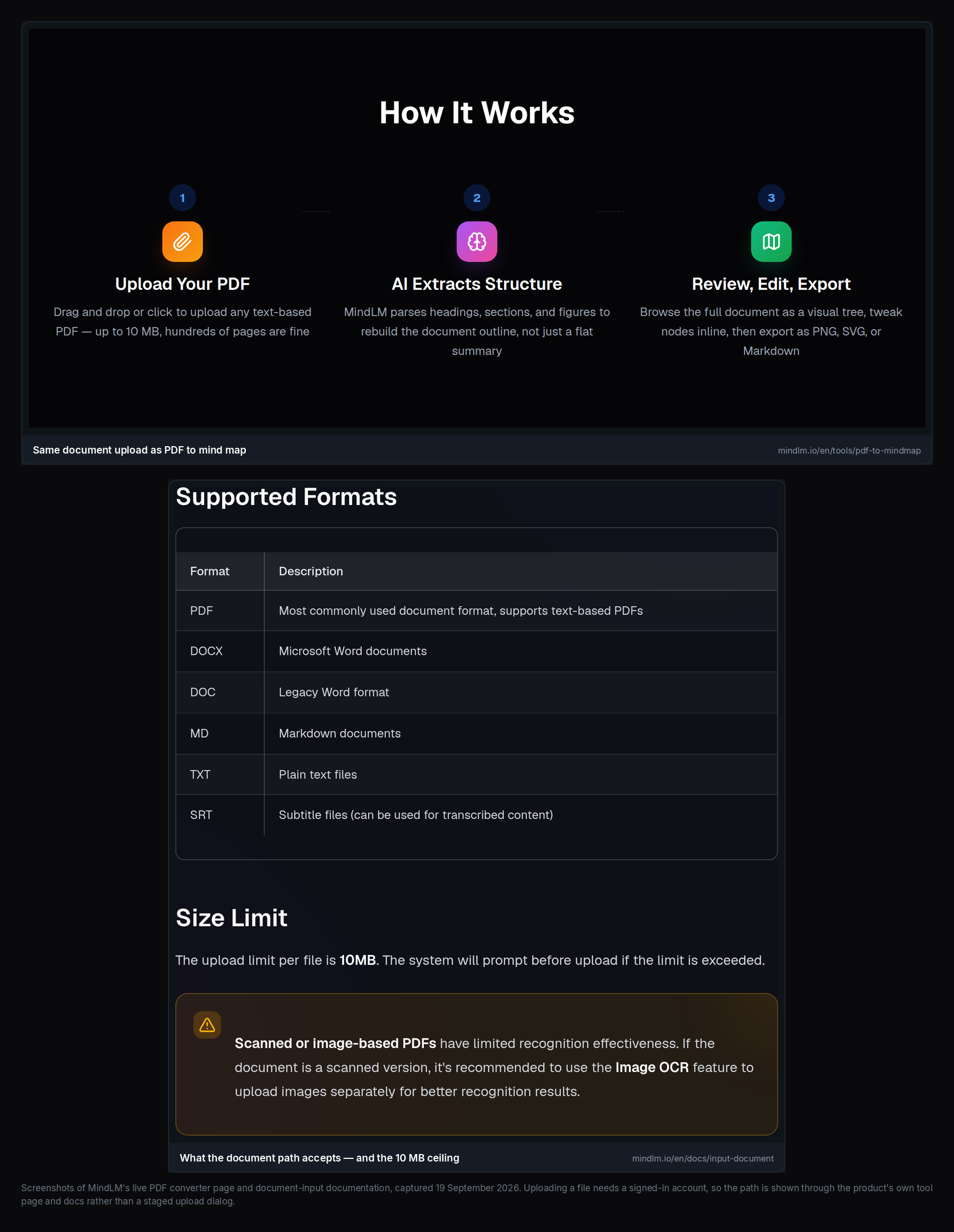 Drop a journal or arXiv PDF — same document upload path, academic structure as the goal.
Try it free on MindLM, or start from the general PDF to mind map flow if your file is already on disk.
Inside the four steps
Four steps. No install.
1. Upload the paper
Use the document upload path. Text-based PDFs work best — exports from LaTeX, Word, or publisher portals with real heading styles. Scanned, image-only PDFs need OCR first; MindLM focuses on embedded text for cleaner structure. Check the live product for current file-size limits (the PDF tool page currently cites roughly 10 MB).
2. Let AI rebuild the outline
MindLM looks for headings, section numbering, and hierarchy cues — the same signals that make a well-formatted paper navigable in a PDF viewer. You get a tree, not a paragraph dump.
3. Edit like you mean it
Rename a fuzzy node. Collapse a Related Work branch you will return to later. Add a child under Contributions for "what I might cite." The map is a working outline, not a frozen summary.
4. Export into your notes
PNG for slides or lab-group chat. Markdown for Obsidian, Notion, or any Markdown vault. SVG on Pro and Max when you need a clean vector for print or design tools. See pricing for what each plan includes.
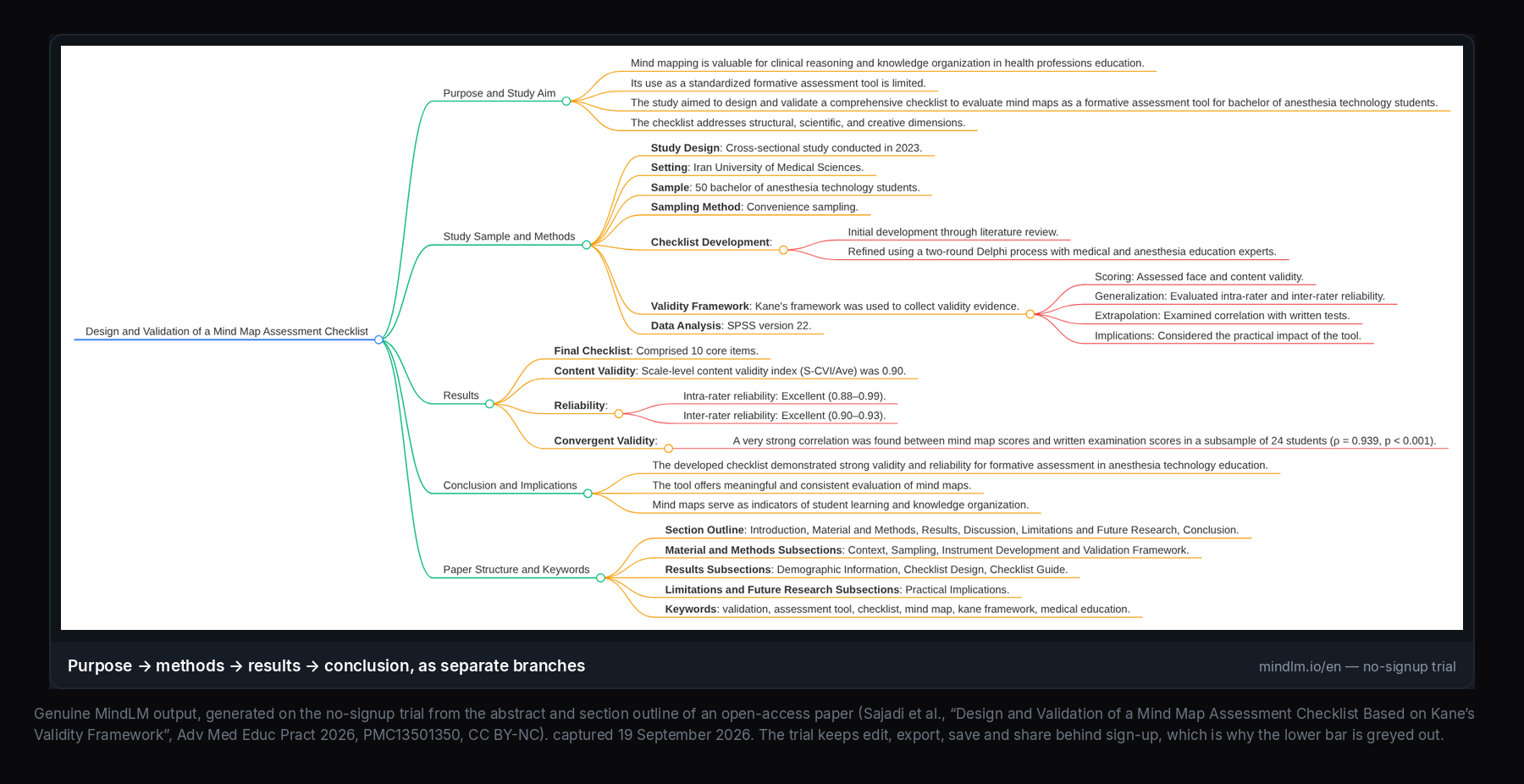 Chapter-aware tree from a research PDF — sections as nodes you can still rewrite.
Why hierarchy beats a flat summary
Generic summarizers answer: What is this paper about? That is useful for triage. It is weak for scholarship.
A flat summary collapses:
- Order — whether a claim appears before or after the evidence
- Scope — what belongs to Related Work vs your paper's contribution
- Reuse — the outline you will need next week when writing related work
A hierarchy-aware map answers a different question: How is this argument assembled? You still have to read the hard parts. You just stop rediscovering the skeleton every time you reopen the PDF.
Other AI mind-map tools in the InstantMind / Mapify class exist, and many of them are fine at multi-format summarization. MindLM's bet on long academic PDFs is simple: keep the author's chapter structure editable, then let Markdown carry that structure into your note system. For a broader product comparison, see MindLM vs Mapify.
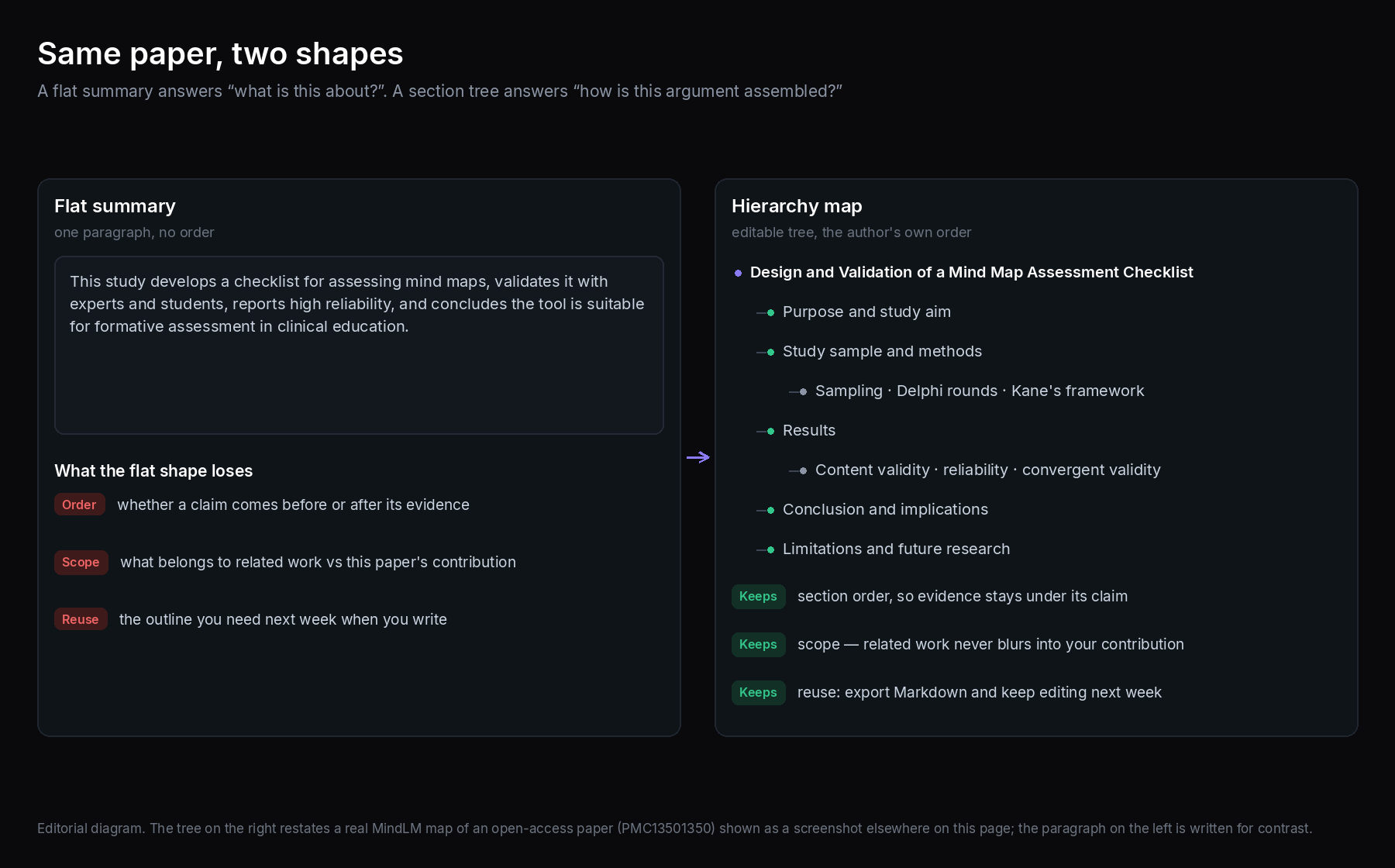 Same paper, two shapes — a paragraph summary vs a tree you can prune and cite from.
Who this is for
Students. Midterms do not wait for perfect reading. Map a required paper before seminar, then annotate the nodes you will discuss. Export Markdown into your course vault instead of rewriting the outline by hand.
Researchers and PhD candidates. Stack papers for a literature review, one map per PDF, then cluster themes yourself. The tool speeds structure recovery; you still own synthesis and citations. A full multi-PDF workflow is in Literature Review with AI Mind Maps.
Anyone taking literature notes. Journal clubs, industry white papers with academic density, grant-proposal background reading — if the PDF has real sections, a hierarchy map is usually a better first pass than a chat transcript.
It is less ideal when you only need a one-sentence "should I read this?" answer. In that case a short abstract skim (or a flat summary) may be enough. Map when you expect to return to the structure.
How this relates to PDF to mind map
PDF to mind map is the general converter: textbooks, contracts, white papers, long reports — any text-based PDF.
Research Paper to Mind Map is the same underlying upload path, framed for academic habits:
| Focus | General PDF tool | This research-paper page |
|---|---|---|
| Typical input | Any long PDF | Papers, arXiv, journal PDFs |
| Success looks like | Chapter/section tree | Intro–methods–results spine you can edit |
| Next step | Notes, decks, sharing | Lit notes, seminar prep, Markdown vault |
If you already use the PDF tool daily, you do not need a second product. Use whichever entry point matches how you search. Both sit under MindLM tools.
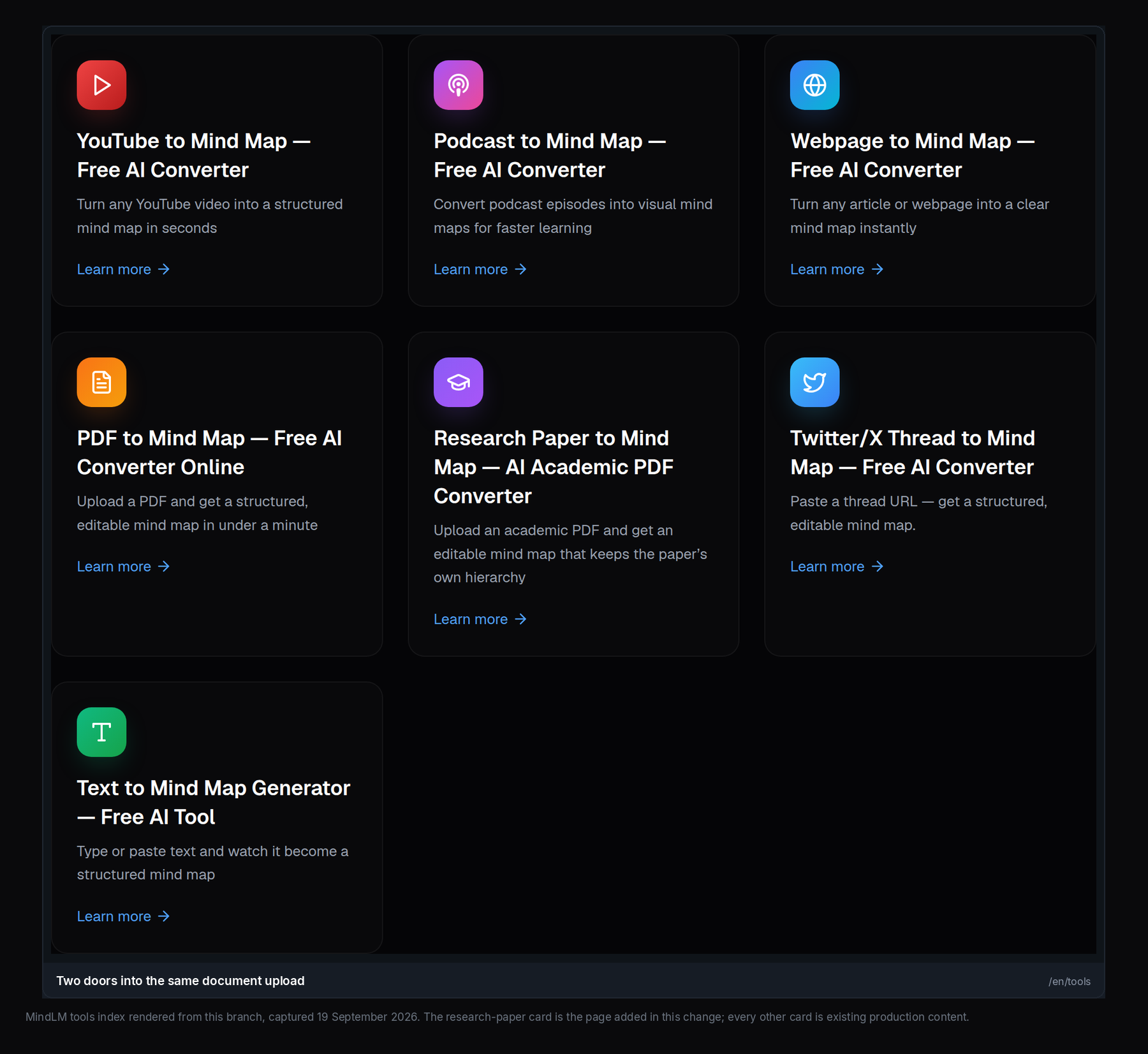 Same document engine — different doors for how you find the workflow.
Practical tips that save a reread
- Prefer publisher or arXiv PDFs with real headings. Decorative title pages and weird conference templates can muddle section detection; well-styled LaTeX usually maps cleanly.
- Map first, deep-read second when surveying. Use the tree to decide which sections deserve an hour.
- Keep the PDF open. Numbers, quotes, and caveats live in the source. The map is a scaffold.
- Name nodes for citation. After generation, retitle a Results child to the claim you might cite — future-you will thank present-you.
- Export Markdown early if Obsidian/Notion is your system of record. PNG is for sharing; Markdown is for lasting notes.
Credits on MindLM: Free includes 10 signup credits plus 1 per daily login (up to 3 maps a day), and document/PDF input is on Free. YouTube, audio, podcast, and Twitter/X threads sit on Pro and above. Exact credit math and export formats (PNG/Markdown on Free and up; SVG on Pro/Max) are on pricing — re-check the live page before you plan a heavy week.
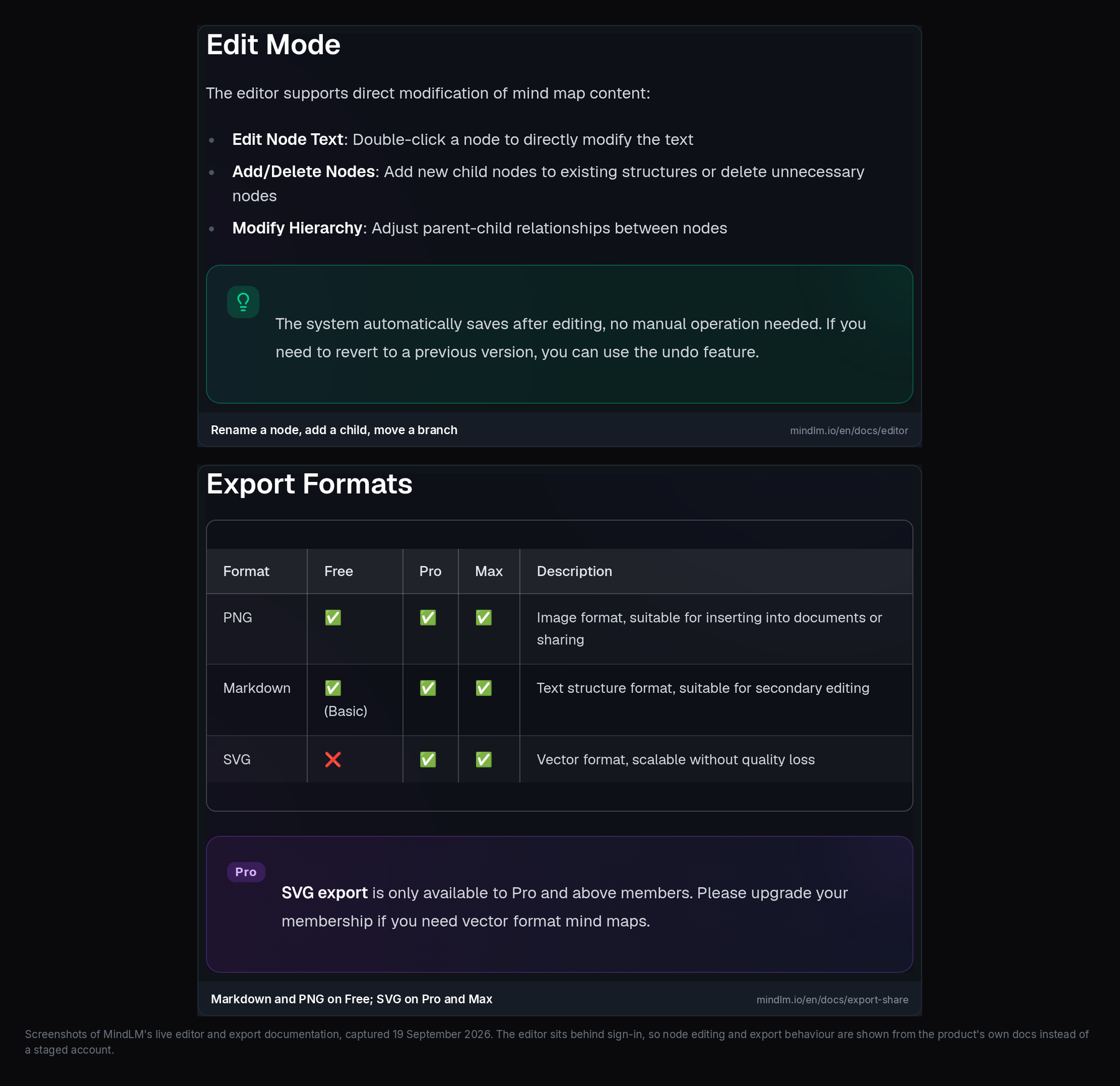 Edit the claim language, then export Markdown into Obsidian or Notion.
Try it on your next paper
Pick a PDF you already owe yourself a reread on. Upload it, skim the tree for five minutes, and decide whether the paper earns a deep read. If the outline is useful, export Markdown into your vault and keep editing nodes as you cite.
- Start mapping: MindLM tools or PDF to mind map
- Plans and credits: /en/pricing
- Multi-paper workflow: Literature Review with AI Mind Maps
The MindLM interface is available in Chinese and English. Pricing and limits change — trust the live pricing page over any cached screenshot.
Frequently Asked Questions
Can I turn any research PDF into a mind map?
Text-based academic PDFs work best. LaTeX exports, journal PDFs with heading styles, and most modern conference papers usually produce a usable chapter tree. Scanned, image-only papers need OCR first. For odd layouts, check the live product — structure quality tracks how consistent the PDF’s headings are.
Is this different from pasting the abstract into a chatbot?
Yes. A chatbot summary is typically a flat paragraph. MindLM aims to rebuild section hierarchy as an editable tree, then let you export it. Use a chatbot for a one-line take; use the map when you need the paper’s skeleton.
Does the Free plan cover research PDFs?
Yes — document and PDF input is included on Free, along with text, web, image, and e-book input. You get 10 credits on signup, no credit card required. Heavy multi-paper weeks are when people look at Pro or Max; see /en/pricing.
What can I export?
PNG and Markdown are available on Free and up; SVG is on Pro and Max. Markdown is the path into Obsidian or Notion. If you need another format, check the live export menu — pricing is the source of truth for what your plan includes.
Will the map replace reading the paper?
No. It compresses structure. It can miss nuance, flatten disagreement in Related Work, or over-weight a flashy figure caption. Use it to orient and to hold an outline — then read the parts that matter for your claim.
Can my lab collaborate on one map in realtime?
MindLM is built around personal generate → edit → export / share-link workflows. It does not market strong realtime co-editing. Share a link or an export when you need to align a group, and treat live co-editing as outside the core product for now.
Where should I go for a full literature-review workflow?
See the companion guide, Literature Review with AI Mind Maps: collect PDFs, map each one, merge themes by hand, then write with the sources open.
Ready to Get Started?
Upload an academic PDF and get an editable mind map that keeps the paper’s own hierarchy. Free to start, nothing to install.
Start Now