Literature Review with AI Mind Maps
How to structure a literature review with AI mind maps — multi-PDF workflow, outlines, and when to trust the map.
A literature review is not a reading contest. It is a structure problem: dozens of PDFs, competing definitions, methods that only look similar until you check the datasets, and a blank document that wants a coherent argument by Friday.
This guide is for grad students, researchers, and anyone doing systematic reading who wants AI mind maps as a drafting aid — not as a substitute for judgment. You will map papers one by one, cluster themes yourself, export notes you can cite from, and write with the sources open.
If you only need to convert a single academic PDF, start on Research Paper to Mind Map. Come back here when the pile grows past five.
Who needs a multi-PDF mind-map workflow
Course papers and qualifying exams. You are not writing a monograph. You still need to show you know the shape of a field — who argues what, where methods diverge, which gaps are real.
Thesis and dissertation chapters. Related Work that sprawls for months. Maps help you keep each paper's spine visible while you decide which claims survive into the chapter outline.
Systematic or semi-structured reviews. Protocol first; tools second. Mind maps will not replace screening logs or PRISMA-style discipline. They can help you see theme clusters once inclusion decisions are made.
Industry researchers and analysts. White papers and academic PDFs arrive in the same week. Hierarchy maps shorten the "what is this arguing?" pass before you brief a team.
Journal clubs and reading groups. One person maps the week's paper; everyone else arrives with the same skeleton and argues about the nodes that matter. Share a PNG or a link for the session; keep Markdown for the person writing notes afterward.
What this is not: a promise that AI will "write your lit review." Synthesis, citation accuracy, and fairness to authors stay human.
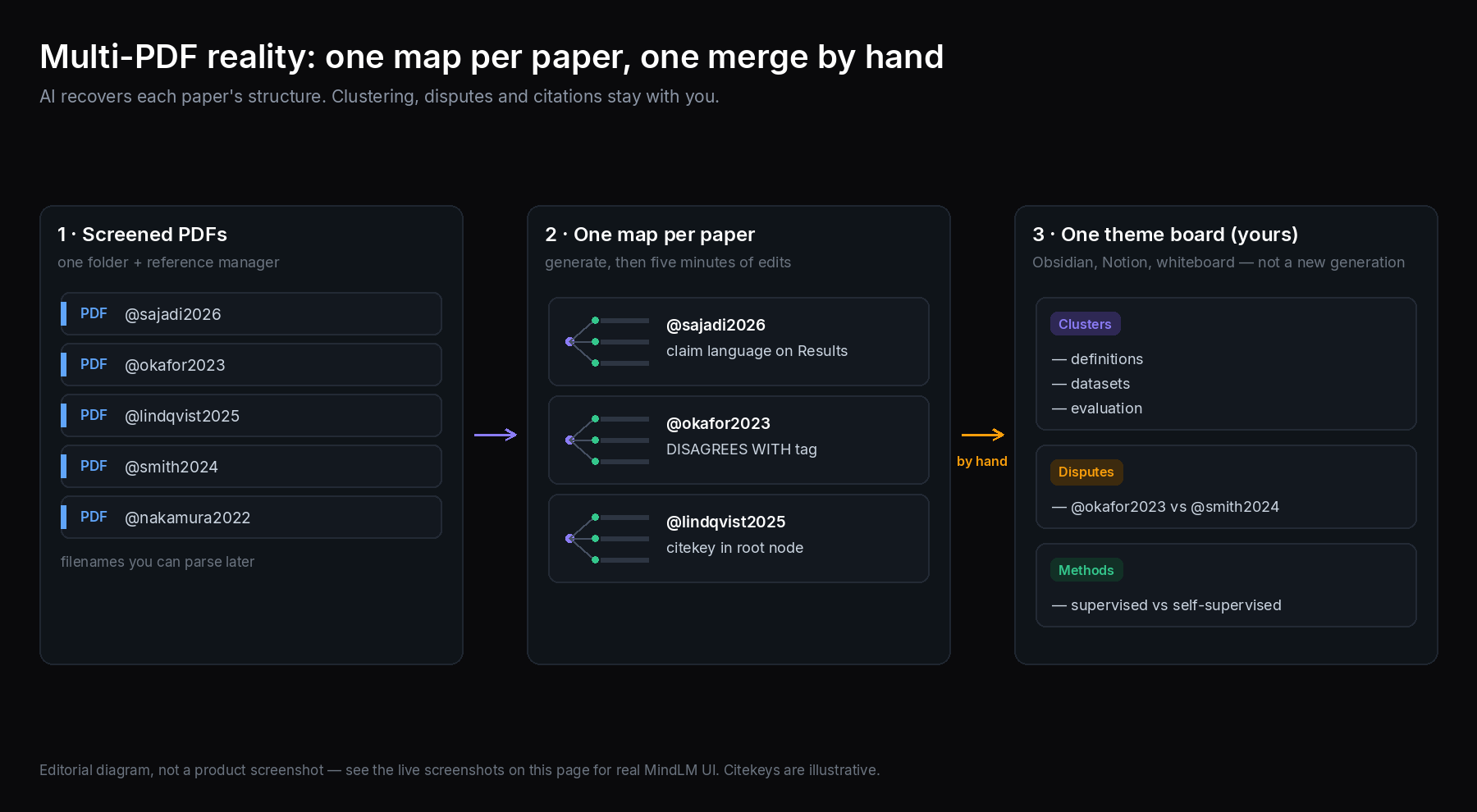 Multi-PDF reality — one map per paper, themes merged by you.
Traditional lit-review pain (and what AI actually fixes)
Classic workflow:
- Collect PDFs in a folder (or Zotero / EndNote / whatever you already trust).
- Skim abstracts; highlight until the PDF looks radioactive.
- Take notes in a doc that slowly becomes unreadable.
- Discover, three weeks later, that two "similar" papers disagree on a definition you never wrote down.
The bottleneck is rarely "I cannot summarize." It is holding structure across many sources while you slowly form an argument.
AI mind maps help with steps 2–3: recover each paper's section hierarchy fast, keep an editable outline, export Markdown into a vault. They do not reliably:
- Deduplicate near-identical claims across papers
- Detect that Author A's "accuracy" is not Author B's metric
- Preserve every citation-worthy number without error
- Replace your reference manager
Treat the map as a working outline per source. Treat your brain (and your citation software) as the integration layer.
Other AI mind-map products exist — InstantMind- and Mapify-class tools included. For feature and pricing contrasts, see MindLM vs Mapify. This article stays on workflow, not a scorecard.
The workflow: collect → map → merge → export → write
Five stages. Skip none of the human ones.
1. Collect PDFs with a boring system
Before any AI:
- One folder (or library collection) per review project
- Filenames you can parse later (
author-year-short-title.pdf) - Reference manager entries before you fall in love with a map
MindLM does not replace Zotero. Map after the paper is already a citable object in your system.
2. Map each paper individually
Use Research Paper to Mind Map or the general PDF to mind map upload. One PDF → one map. Resist the urge to paste three papers into one generation and hope for a "merged review." Cross-paper themes are your job.
On each map, spend five minutes:
- Rename vague nodes ("Results") into claim language ("X improves Y on dataset Z — check Table 2")
- Flag disputes with a child node:
DISAGREES WITH — AuthorB 2021 - Delete marketing-y abstract fluff you will never cite
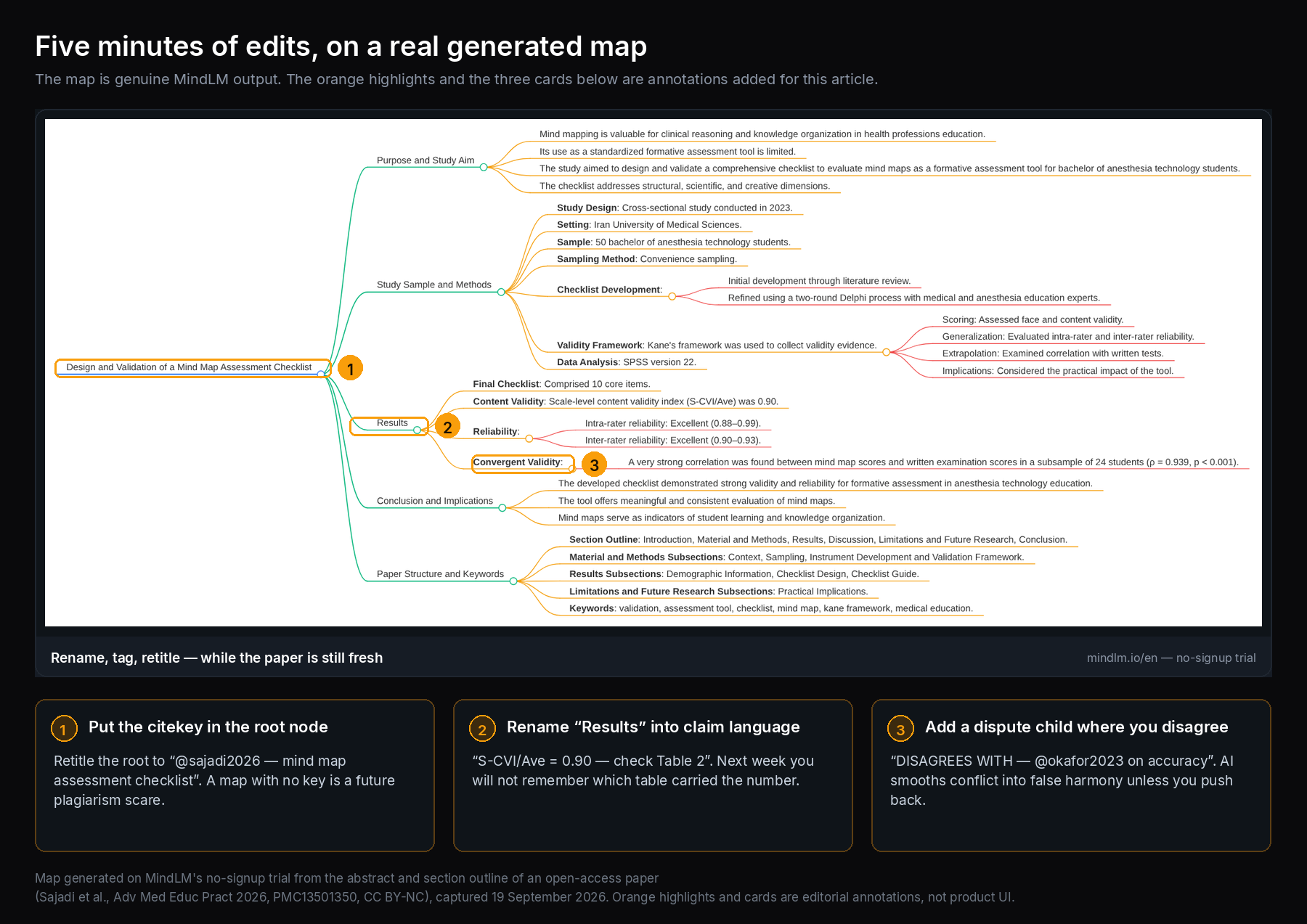 Edit while the paper is fresh — dispute tags beat memory. (The map is genuine MindLM output; the orange highlights are added annotations.)
3. Merge themes outside the generator
Open three to five maps (or their Markdown exports). Build a theme board in Obsidian, Notion, a whiteboard, or a new blank mind map you create manually:
- Theme clusters (definitions, datasets, evaluation, ethics, deployment)
- Disputes (who contradicts whom)
- Method contrasts (supervised vs self-supervised, lab vs field, sample size)
MindLM's strength here is supplying clean per-paper trees and Markdown. Strong realtime multi-user canvas collaboration is not the product's pitch — plan to merge themes in the tools you already write in.
4. Export Markdown / notes you can cite from
PNG is fine for a lab meeting. For a literature review, Markdown is the lasting artifact: drop it into Obsidian or Notion beside the Zotero citekey. Keep the PDF link or citekey in the map's root node title so you never orphan a claim.
Pro and Max add SVG when you need vectors; Free includes PNG and Markdown. Document and PDF mapping is available on Free (10 signup credits plus 1 per daily login, up to 3 maps a day). Confirm current numbers on /en/pricing.
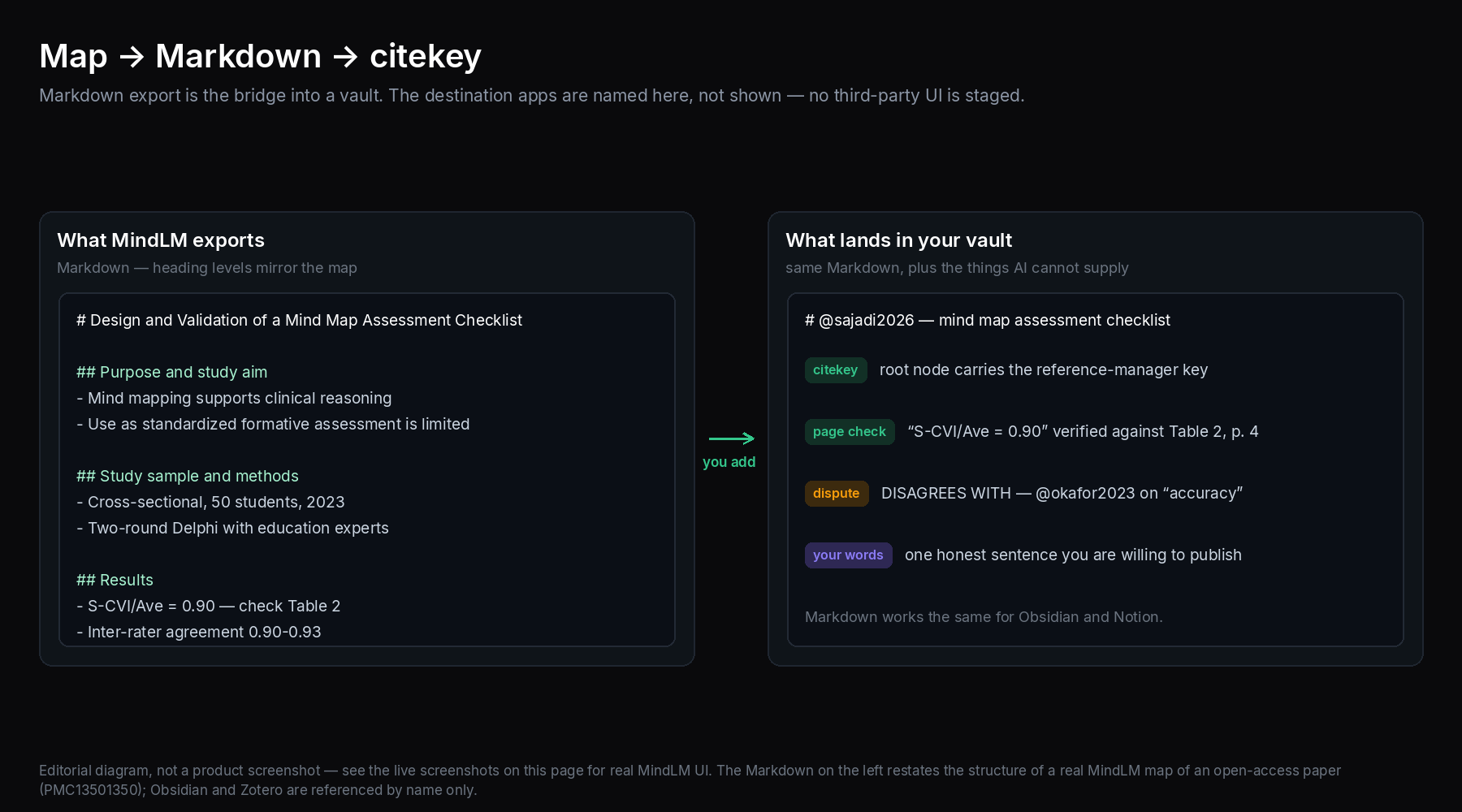 Map → Markdown → citekey — notes that survive past the semester.
5. Write with sources open
Outline from your theme board. Every paragraph that asserts a finding should still be checked against the PDF — page, table, exact wording. The mind map got you to the right section faster; it did not notarize the claim.
Organizing multi-PDF: clusters, disputes, methods
Theme clusters
After ten papers you will see repeats: "everyone cites Dataset D," "everyone waves at limitation L." Put those under stable headings in your master outline. Attach paper nodes (or citekeys) as children — not as a new AI generation that invents a consensus.
Disputes
Literature reviews earn their keep on disagreement. When two maps both have a "Definition of X" branch, open both PDFs and write one honest sentence: who defines X how, and why it matters for your question. AI will often smooth conflict into false harmony. Do not let it.
Method contrasts
Build a small comparison table (even in Markdown):
| Paper | Method family | Data | Claim you might cite | Caveat |
|---|---|---|---|---|
@citekey | supervised / self-supervised / rule-based | sample, source, years | one sentence, with table or page | what the authors concede |
Fill it from maps and PDFs — the row above is the template, not real data. The table becomes the spine of a methods subsection; the maps become navigation aids.
Honesty check
The tool assists. You verify. If a node says "significant improvement" and you cannot find the number in the paper, delete the node or rewrite it as a question. Over-trust is the main failure mode of AI-assisted reviews — more on that below.
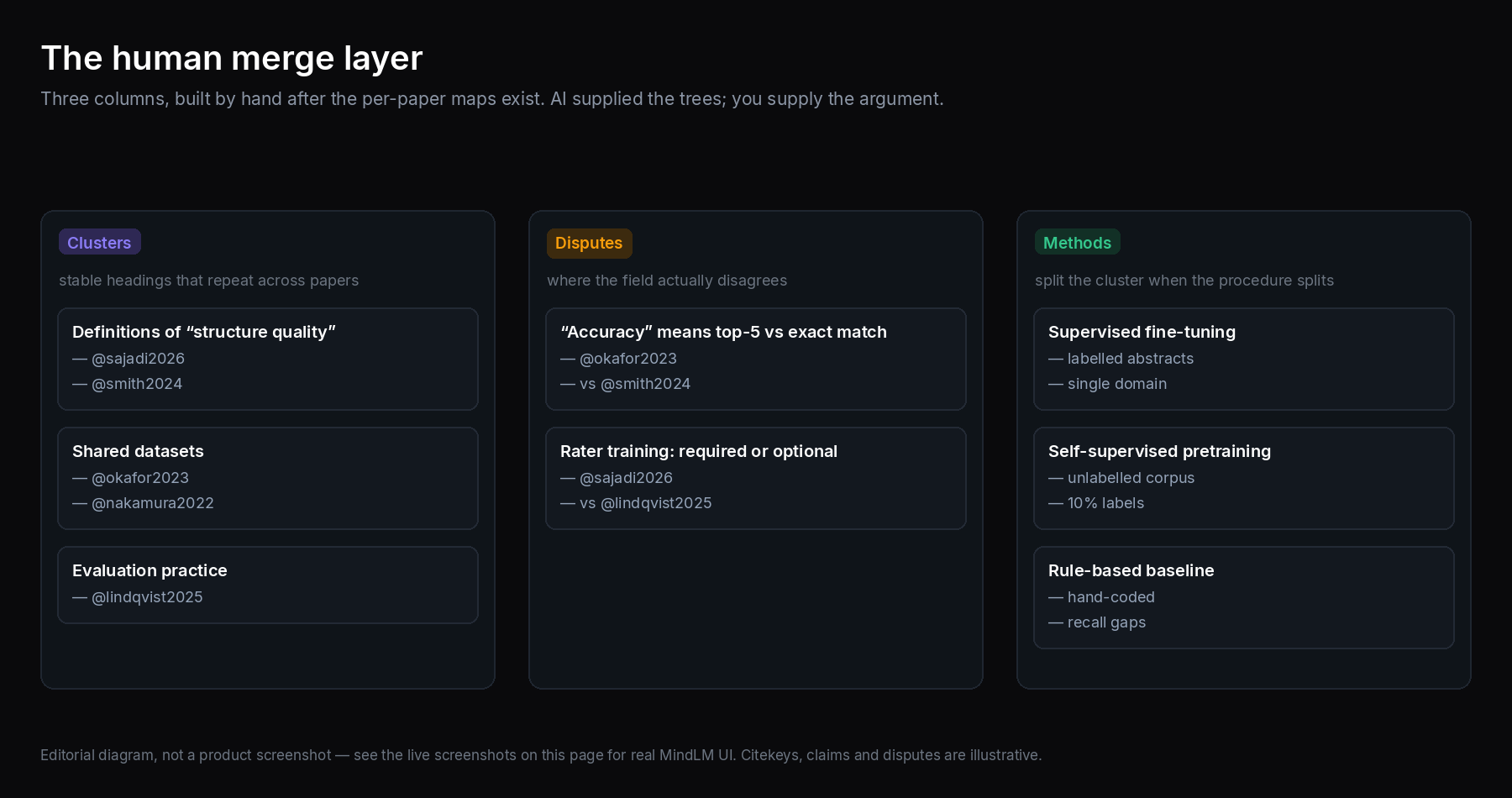 Human merge layer — AI supplied the trees; you supply the argument.
A sample week (illustrative, not a quota)
None of this needs a perfect protocol. A workable rhythm for a course paper looks like:
- Monday: Pull eight PDFs that passed abstract screening. Enter them in your reference manager.
- Tuesday–Wednesday: Map four papers a day. Five-minute edits each. Export Markdown the same day so maps do not pile up unread.
- Thursday: Theme board only — no new PDFs. Force disputes onto the board even if they feel awkward.
- Friday: Write from the board. Every factual sentence gets a page check.
PhD timelines stretch the same loop over months. The rule stays: map narrowly, merge deliberately, write with PDFs open.
Credit math is personal. Free (10 signup credits + 1 per daily login, up to 3 maps a day, document and PDF included) is enough to learn the loop. A dense week of twenty papers is when Pro or Max stops being theoretical. YouTube keynotes and podcast interviews of authors — useful adjuncts to PDFs — require Pro or above on MindLM.
Concrete MindLM steps
- Sign in at MindLM (the interface is available in Chinese and English).
- Open Research Paper to Mind Map or PDF to mind map.
- Upload a text-based research PDF. Prefer well-headed LaTeX or publisher files; OCR scanned pages first.
- Generate; wait for the hierarchy tree (long files may run as async tasks — check the live product behavior).
- Edit nodes: claim language, dispute tags, citekeys in titles.
- Export Markdown into your vault; PNG only if you are presenting.
- Repeat per paper. After a batch, merge themes in your note tool.
- If you hit Free daily limits during a crunch week, compare Pro ($4.99 / 200 credits) and Max ($9.99 / 600) on /en/pricing. YouTube, audio, podcast, and Twitter inputs are Pro and above if your "literature" includes talks and threads.
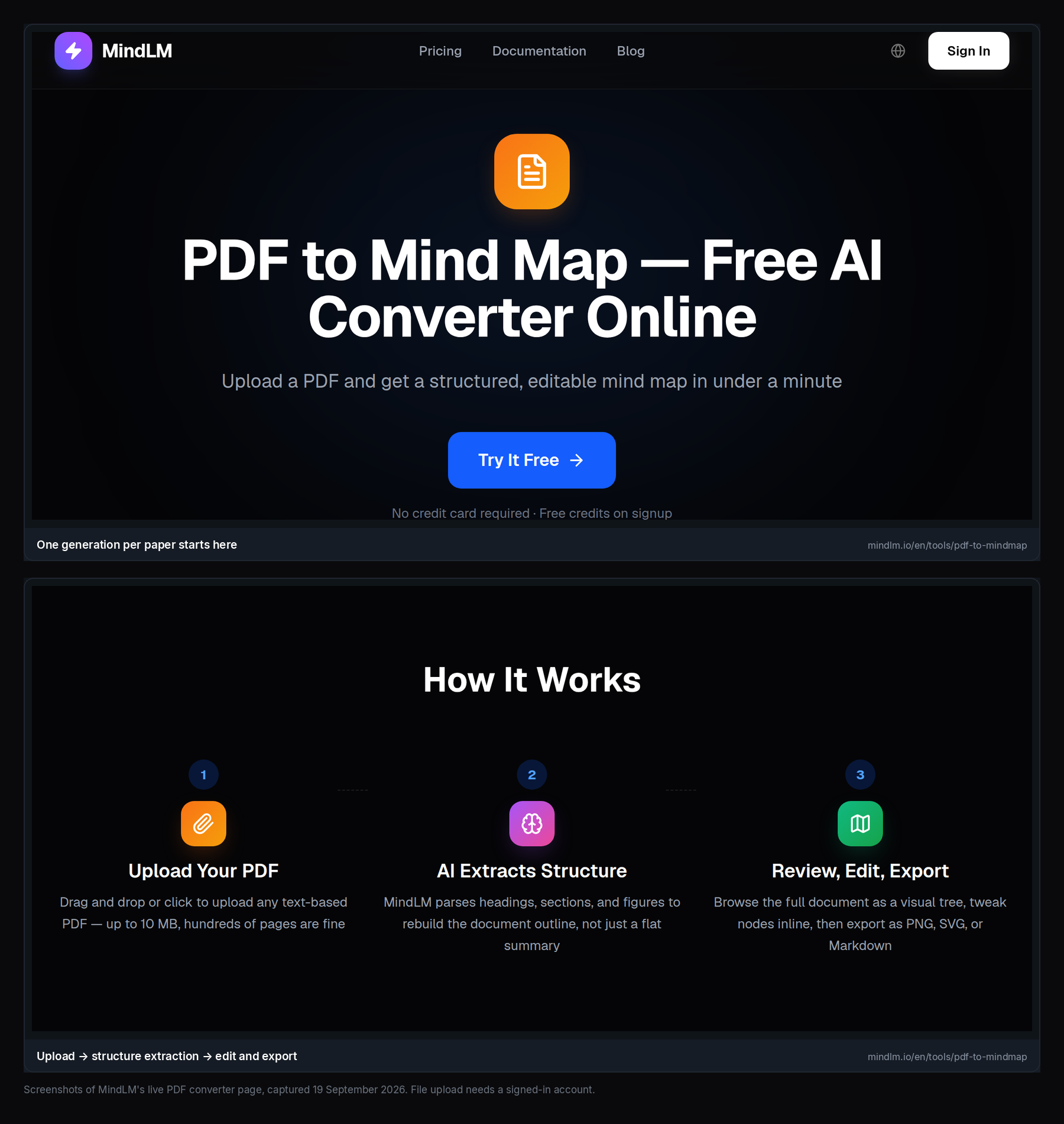 One credit-shaped generation per paper — batch the queue, not the PDFs into one blob.
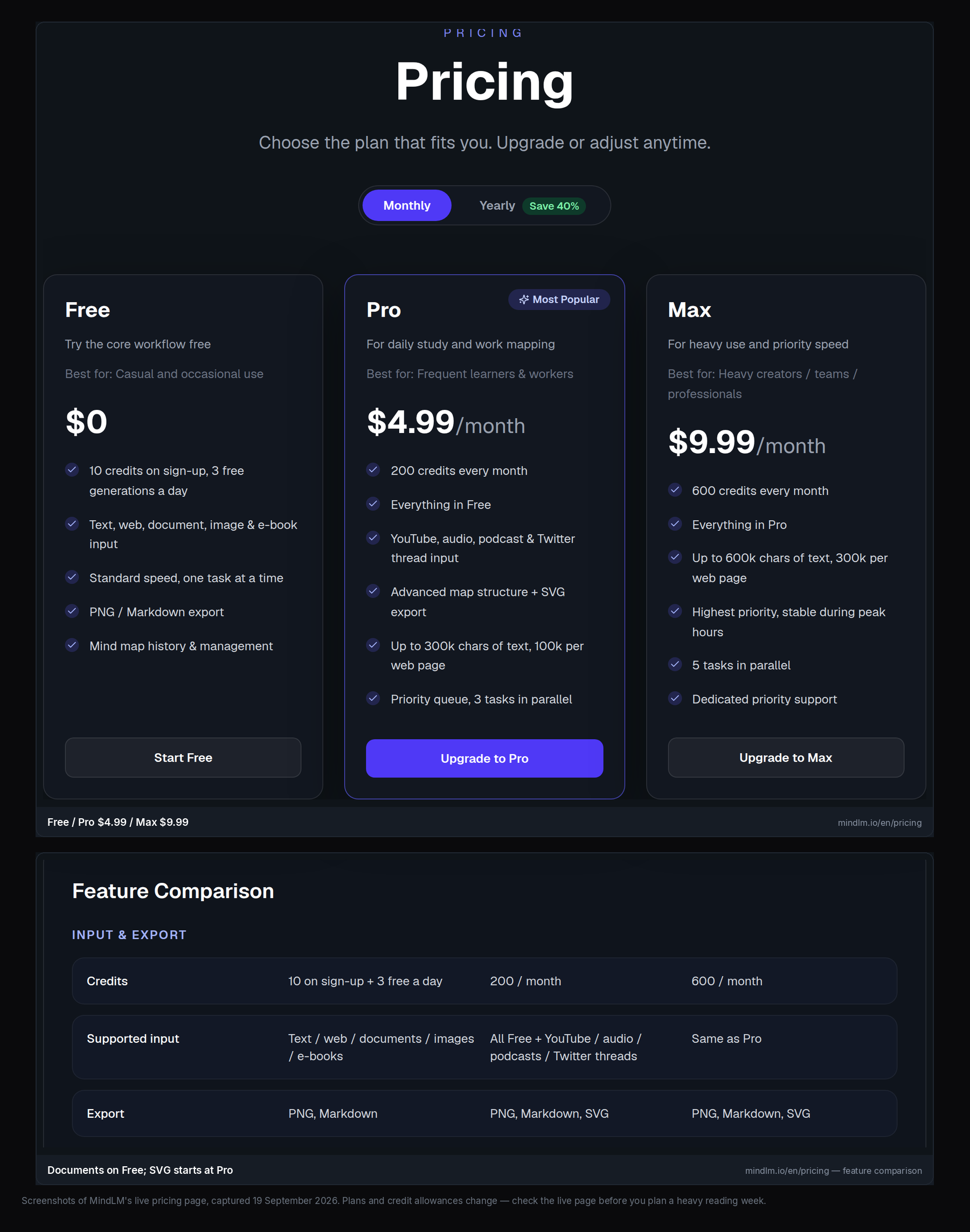 Free is enough to test the loop; paid tiers matter when the pile is tall.
Common mistakes
Over-trusting the AI outline
Heading detection is strong on clean academic PDFs; it is not infallible. Weird templates, camera scans, and papers with decorative section titles can produce odd branches. Skim the PDF bookmarks (or table of contents) against the map once.
Losing citations
A beautiful map with no citekeys is a future plagiarism scare. Put (@smith2024) or your manager's key in the root node. Never paste map prose into a manuscript without re-reading the source.
Merging too early
Generating one mega-map from concatenated PDFs usually produces mush. Keep per-paper fidelity until you decide the themes.
Treating Related Work as truth
Authors frame prior work to favor their contribution. Your map will inherit that framing unless you push back.
Ignoring plan limits mid-crunch
Free: document and PDF input yes, with a daily generation cap. Pro and Max: more credits, advanced structure, SVG; media inputs start at Pro. Plan the week against /en/pricing, not against hope.
Expecting realtime lab co-editing
Share exports or links. If your team needs simultaneous canvas editing, use a dedicated whiteboard and keep MindLM as the per-paper generator.
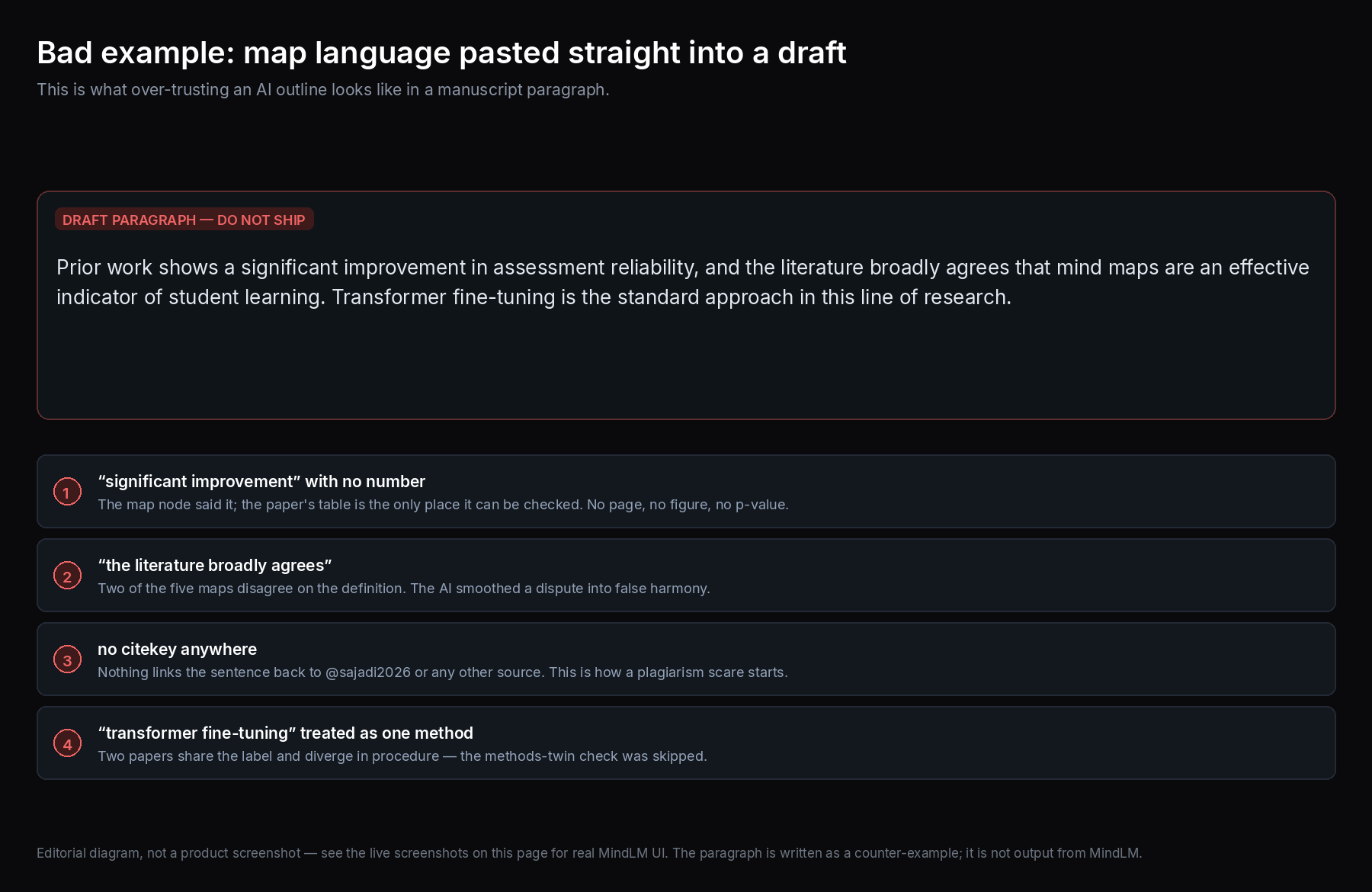 Red flag — map language in the draft, no page check, no citekey.
Skipping the "methods twin" check
Two papers can share a buzzword and diverge in procedure. If both maps show a node called "transformer fine-tuning," open both Methods sections before you write "prior work fine-tunes transformers." Your theme cluster should split when the procedure splits — even if the AI labels look identical.
FAQ
How many papers can I map for one review?
As many as your credits and attention allow. Practically, map in batches of five to ten, merge themes, then continue. There is no magic "whole corpus" button that replaces screening.
Should I map every PDF I download?
No. Map the ones that survive your inclusion criteria — or the borderline ones you need to understand before deciding. Mapping everything feels productive and wastes credits.
Can MindLM read non-English papers?
Content handling covers multiple languages (English and Chinese among them; the PDF tool page lists others). The interface itself supports Chinese and English. For edge languages or translation-during-generation options, check the live product.
Is hierarchy better than a chatbot summary for lit review?
For structure retention, usually yes. For a one-line "is this relevant?" triage, a short abstract or chatbot skim can be enough. Use hierarchy when you expect to reuse the outline.
What if the chapter tree looks wrong?
Edit it. Rename, drag, delete. Then glance at the PDF's real headings. Persistent failures on a specific file often mean the PDF lacks clean text structure — try a better source file from the publisher or arXiv.
Where do exports fit Obsidian vs Notion?
Markdown is the bridge for both. PNG for sharing; SVG on Pro and Max when you need vectors. Confirm formats on the live pricing and export menus if something looks missing in your account.
Start the next paper, not the perfect system
Pick five PDFs you already know belong in the review. Map each with Research Paper to Mind Map, export Markdown, and build one theme board by hand tonight. Tomorrow, write one dispute paragraph with both sources open.
- Single-paper converter: /en/tools/research-paper-to-mindmap
- General PDF flow: /en/tools/pdf-to-mindmap
- Credits and plans: /en/pricing
- Tool landscape: MindLM vs Mapify
AI can recover a paper's skeleton in minutes. Only you can decide what the field is arguing — and what you are willing to put your name under.